

Download 2D 3D Screen Saver Maker – Screen Saver Maker, 2D 3D Effects, Image Slideshow, Video Screensaver, Custom Screensaver, Animation Effects
Overview
2D 3D Screen Saver Maker is a utility application designed to empower users with the tools needed to create personalized screensavers using a variety of media types. The app enables users to import images, videos, and Flash animations, combining them with dynamic 3D effects and transition options to produce visually engaging content. Its primary purpose is to simplify the process of crafting custom screensavers without requiring advanced technical knowledge or design expertise. This makes it particularly useful for hobbyists, digital artists, and users who want to personalize their computing experience with unique visual displays.
The application targets individuals seeking creative control over their desktop environments, especially those interested in multimedia presentations or digital storytelling through slideshow formats. While the developer, 2D 3D Screen Saver Maker, is listed, no further background information is available regarding their history or other products. The app was released on April 4, 2007, placing it in a long-standing position within the utility category, indicating a focus on stability and basic functionality over frequent updates.
Real-world use cases include creating birthday or event-themed screensavers, showcasing personal photo collections, or presenting promotional content in public spaces. In the broader app ecosystem, 2D 3D Screen Saver Maker serves as a niche yet functional tool for users who value visual customization and creative expression on their desktops. Despite its age, the app remains relevant for those seeking a lightweight, free solution for screen saver creation.
Key Features & Functionality
2D 3D Screen Saver Maker offers a set of core functionalities tailored to the creation of animated and visually rich screensavers. The application features a user-friendly interface designed for accessibility across skill levels, allowing users to navigate menus and tools intuitively. This ensures that even those without prior experience in graphic design or video editing can produce professional-looking results.
- User-Friendly Interface: The layout is structured with clear menus and logical workflows, minimizing the learning curve and enabling quick project initiation.
- Diverse Media Sources: Users can import images, videos, and Flash animations, offering flexibility in content selection and enhancing the creative potential of each screensaver.
- Extensive 3D Effects and Transitions: The app provides a range of 3D visual effects and transition animations, allowing users to add depth and motion to their slideshows for a more immersive experience.
- Export and Sharing Options: Completed screensavers can be exported and shared with others, with an optional feature to include developer attribution for proper credit.
For example, a user might create a birthday slideshow by importing family photos, applying a rotating 3D cube transition, and adding a fade-in effect between images. Another user could compile a video montage of travel footage with animated 3D overlays to display on a public display. These practical applications demonstrate the app’s utility in both personal and informal professional contexts.
Interface, UX & Performance
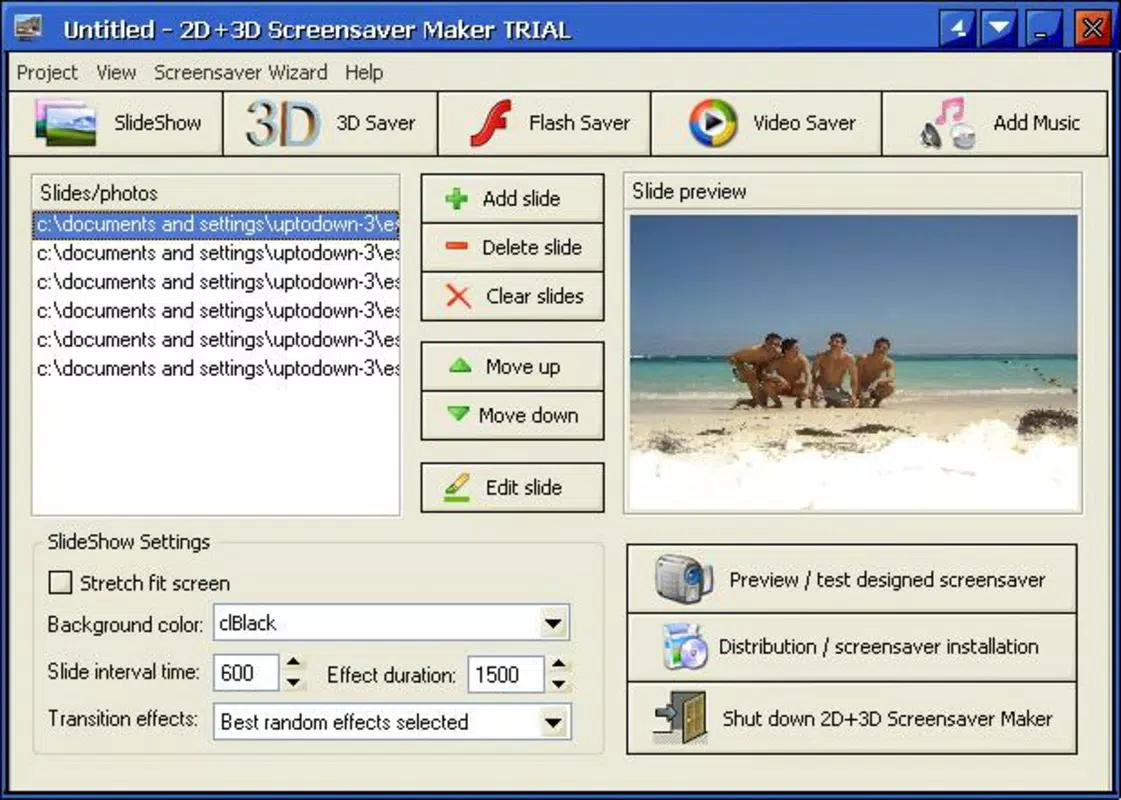
The user interface of 2D 3D Screen Saver Maker is designed with simplicity and functionality in mind. The layout appears to follow a linear workflow, guiding users through the process of selecting media, applying effects, and exporting the final output. Navigation is likely based on standard desktop controls, with toolbars, preview windows, and configuration panels arranged for ease of access.
Visual style is consistent with early 2000s desktop applications—functional rather than modern or minimalist. While the aesthetic may feel dated by today’s standards, it prioritizes usability over visual flair. The app’s responsiveness is expected to be stable on systems meeting basic requirements, though no formal performance benchmarks were provided.
Although the developer did not list formal performance metrics, the application’s file size of 2.4 MB suggests it is lightweight and optimized for low-resource environments. It is likely to run smoothly on older Windows systems without significant strain on CPU or memory. Stability may vary depending on the complexity of the project and the source media quality, but no reported issues were mentioned.
Platform Compatibility & Technical Requirements
2D 3D Screen Saver Maker is available exclusively for the Windows platform. The application is compatible with Windows operating systems, though specific version requirements were not listed. The software version is 1.0, indicating a stable initial release with no major updates documented.
The file size is 2.4 MB, which is compact and suitable for quick downloads and installations. The app is offered free of charge, making it accessible to users seeking a no-cost solution for screen saver creation. While no detailed technical specifications were provided, the lightweight nature of the software suggests it is designed for minimal system impact.
Compatibility information was not fully disclosed, so users should exercise caution when installing on newer or less common Windows configurations. The developer did not specify minimum OS requirements, so installation on modern Windows versions may depend on compatibility mode or system settings.
Pros and Cons
Pros
- Free to download and use, making it accessible to all users.
- Lightweight file size (2.4 MB) ensures quick installation and minimal system load.
- Supports multiple media types, including images, videos, and Flash animations.
- Offers a variety of 3D effects and transitions for enhanced visual appeal.
- Includes export and sharing functionality with optional developer credit.
Cons
- No information was provided about supported Windows versions or system requirements.
- App was released in 2007, raising concerns about compatibility with modern systems.
- Developer did not provide updates or recent maintenance details.
- Interface may appear outdated compared to current desktop applications.
- No cloud integration, social sharing, or collaborative features are documented.
FAQ
Is 2D 3D Screen Saver Maker safe to download?
Yes, the app is reported as free and available without known malware. However, users should download from official or trusted sources to ensure security.
Can I use 2D 3D Screen Saver Maker on Windows 10 or 11?
While the app was released in 2007, it may run on newer Windows versions using compatibility mode. No official support was confirmed.
Does the app require an internet connection?
No, the application operates offline once installed. Internet access is not required for core functionality.
Can I include my own name in the exported screensaver?
Based on the available information, the app allows users to include developer information. Custom attribution may be possible, though details were not specified.
Is there a mobile version of 2D 3D Screen Saver Maker?
Currently, the app is only available for Windows. No mobile or cross-platform versions were mentioned.
Final Thoughts
2D 3D Screen Saver Maker remains a functional and accessible tool for users interested in creating custom visual displays for their desktops. Despite its age and lack of modern features, it delivers on its core promise: enabling users to build personalized screensavers with minimal effort. Its support for multiple media types and dynamic 3D effects offers creative flexibility, while the lightweight design ensures compatibility with older systems.
While the interface may feel dated and compatibility with current Windows versions is uncertain, the app’s free nature and straightforward workflow make it a viable option for hobbyists and casual users. For those seeking a no-cost, no-frills solution to generate image slideshows with animation, this utility still holds value.
Download 2D 3D Screen Saver Maker now


